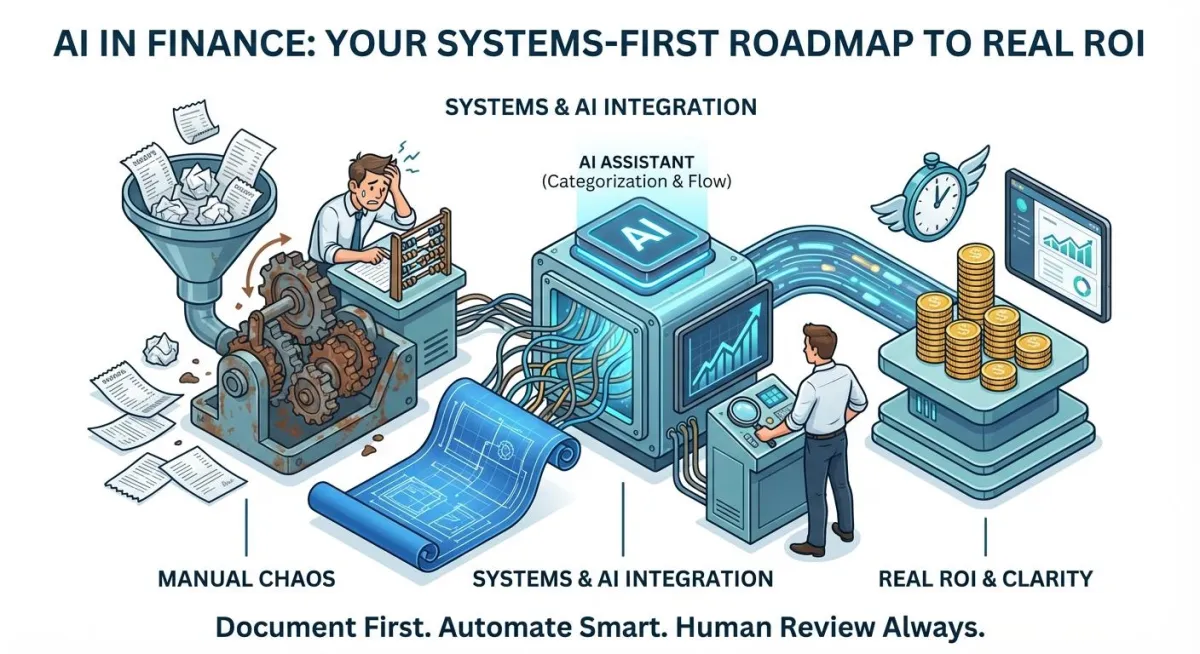
AI in Finance: Your Systems-First Roadmap to Real ROI
AI in Finance: Your Systems-First Roadmap to Real ROI
Introduction
Hello, fellow business builders.
It's 2026, and if you're like most small business owners, your plate is overflowing. You're juggling sales, operations, HR, and, of course, the ever-present beast of finance and accounting. You've got your systems, your routines, the ways you've always done things – they're etched into your brain, the result of years of trial, error, and hard-won experience. And frankly, they work, mostly. So, when a new buzzword like 'AI' comes along, promising to revolutionize everything, it's easy to feel overwhelmed, skeptical, or even a little resistant. Trust me, I get it. After three decades in this industry, I've seen more 'game-changers' than I care to count.
The real challenge isn't just understanding what AI can do, but understanding how to integrate it into the deeply ingrained patterns of your business without breaking what already works. It's about retraining your own thinking, and that of your team, to embrace new efficiencies while still maintaining control. This isn't about throwing out your trusted processes; it's about systematically identifying where AI can genuinely augment them, freeing up your most valuable asset: your time and mental energy. We're going to talk about finance today, but remember, the principles are universal: systems first, literacy before implementation, and always, always a clear path to ROI.
Readiness Check
Which statement best describes your current approach to financial processes?
A. My financial processes are mostly manual, or I rely heavily on a single person's institutional knowledge. Documentation? What's that?
B. I use standard accounting software, and I have some documented processes, but I'm curious about how AI can help with repetitive tasks.
C. My financial systems are well-documented and mostly automated, but I'm looking for ways to integrate AI for deeper insights or predictive analysis.
Solutions by Implementation Level
1. AI-Assisted Transaction Categorization & Reconciliation Review
Level: AI Literacy
This isn't about letting AI run wild with your books. It's about leveraging AI to perform the tedious, rules-based tasks of categorizing bank and credit card transactions, and then presenting them to you for a quick, confident review. Think of it as a highly efficient junior bookkeeper who never sleeps, but still needs a senior accountant (that's you, or your actual bookkeeper) to double-check their work. The system here is to document your current categorization rules, then train the AI to follow them, and finally, integrate a human review step.
Implementation Details:
Timeline: 4-8 hours initial setup and training (spread over 1-2 weeks), ongoing 1-2 hours/month for review.
Cost: $20-$60/month (for AI-enhanced accounting software or a specialized tool) + 4-8 hours setup at your internal rate.
ROI: Saves 5-15 hours/month on manual categorization and reconciliation prep. At $30/hour, that's $150-$450/month in savings, easily a 3x return.
Failure Rate: 15% might struggle with initial training data or nuanced categorizations, requiring consultant help or more dedicated internal time. The biggest failure is relying on it 100% without human review.
Action Steps:
Document Your Current Categories: Before touching any AI, clearly list how you categorize every type of expense and income. This is non-negotiable.
Choose an AI-Enhanced Tool: Select an accounting platform (or an add-on) that offers AI-driven transaction categorization. Start with a free trial.
Train & Review: Feed your historical data (or start fresh) and actively review the AI's suggestions. Correct its mistakes – this is how it learns your specific patterns.
Implement Regular Review: Establish a weekly or bi-weekly routine for a human (you or your bookkeeper) to review all AI-categorized transactions before final approval.
Recommended Tools:
Xero (AI tools) - $15-$60/month
Gusto (AI-backed financial tools) - Varies by plan
Dext (for receipt/invoice capture & categorization) - $20-$50/month
Protective Warning: The biggest pitfall here is 'set it and forget it.' AI is excellent at pattern recognition, but it lacks judgment. Bank fees, unusual vendor names, or re-categorizations (e.g., a personal expense accidentally on a business card) will confuse it. ALWAYS have a human review step. Without it, you're risking inaccurate books and potential audit headaches.
2. Smart Invoicing & Basic Financial Reporting with AI
Level: AI Literacy
Beyond just categorizing, AI can assist in generating invoices, flagging potential errors, and even pulling together basic financial reports. This isn't about replacing your accountant; it's about reducing the manual effort in generating these documents and reports, allowing you to focus on the insights rather than the data entry. The system involves documenting your invoicing process, training AI on your templates, and then using it to draft, with human oversight for accuracy and compliance.
Implementation Details:
Timeline: 3-6 hours initial setup and template configuration.
Cost: $30-$70/month (for AI-enhanced invoicing/reporting features in accounting software).
ROI: Saves 3-8 hours/month on invoice creation, error checking, and basic report generation. At $30/hour, that's $90-$240/month in savings. Factor in reduced errors, and the ROI is solid.
Failure Rate: 10% might generate invoices with incorrect details if templates aren't precise or if product/service codes are inconsistent. Reporting can be misleading if underlying data is flawed.
Action Steps:
Standardize Invoicing Process: Document your current invoicing workflow, including templates, payment terms, and client-specific notes.
Utilize AI-Powered Invoicing: Choose an accounting or invoicing tool with AI features for drafting invoices based on project data or time tracking.
AI-Assisted Report Generation: Explore features that can generate basic P&L, balance sheets, or cash flow reports with a few clicks, pulling data from your categorized transactions.
Human Review & Customization: Always review AI-generated invoices for accuracy before sending. Use AI-generated reports as a starting point, understanding their limitations and adding your own qualitative insights.
Recommended Tools:
ccMonet (AI-powered finance partner) - Varies
HubiFi (AI accounting tools) - Varies
Protective Warning: AI is only as good as the data it's fed. If your services or product codes are inconsistent, or if client details are outdated, AI will perpetuate those errors. Double-check every invoice before it leaves your hands. For reporting, remember that numbers without context are just numbers – AI can't tell you why sales dipped, only that they did.
3. Automated Financial Data Flow: From Source to Ledger
Level: Integration
This is where we start connecting the dots. Instead of manual data entry or periodic uploads, we're talking about setting up systems where financial data (receipts, invoices, bank statements) flows automatically from its source into your core accounting software, pre-categorized and ready for review. This involves API integrations and workflow automation. The system here is about creating a robust, documented 'data pipeline' with clear checkpoints and alerts for anomalies, moving beyond simple tool usage to a more interconnected operational flow.
Implementation Details:
Timeline: 10-20 hours for initial setup, mapping, and testing (over 2-4 weeks).
Cost: $50-$200/month (for integrated AI bookkeeping services or advanced accounting software tiers) + 10-20 hours setup at internal/consultant rate.
ROI: Saves 15-30 hours/month on data entry, reconciliation, and chasing missing documents. At $30/hour, that's $450-$900/month in direct savings, plus reduced errors and faster insights. This is easily a 3-5x return.
Failure Rate: 30% encounter integration hiccups, data mapping challenges, or initial resistance from team members. Requires dedicated troubleshooting and clear communication. The biggest risk is not setting up proper error handling and alerts
Action Steps:
Map Your Entire Financial Data Journey: Document every single point where financial data enters or leaves your business – from sales receipts to vendor invoices to payroll.
Identify Integration Points: Choose an AI bookkeeping tool or accounting platform that offers robust integrations (APIs) with your bank, payment processors, and other key systems (e.g., CRM, POS).
Configure & Test Integrations: Set up the automated feeds. Crucially, test them thoroughly with a small batch of data to ensure correct mapping and categorization rules are applied.
Establish Anomaly Alerts & Review Process: Configure the system to flag unusual transactions or data discrepancies. Maintain a weekly human review for approvals and exceptions, ensuring a clear audit trail.
Recommended Tools:
Botkeeper (AI for accounting firms) - Custom
Truewind (AI bookkeeping software) - Custom
Protective Warning: The more automated you become, the more critical your initial system design and ongoing monitoring. 'Garbage In, Garbage Out' is amplified. A poorly configured integration can silently corrupt your financial data. Ensure strong data validation, clear error logs, and a dedicated person (or team) responsible for oversight. Don't automate a broken process; fix it first, then automate.
Real-World Example
Type: success
Business: Local bakery & cafe, 12 employees
Situation: The owner, Maria, spent 15-20 hours a month manually entering receipts, categorizing expenses, and reconciling bank statements. She was constantly behind, often missing early payment discounts and struggling to get a real-time view of cash flow.
Approach: Maria, after documenting her existing (and somewhat chaotic) manual process, implemented an AI-enhanced accounting platform. She spent about 6 hours over two weeks setting up rules for transaction categorization and connecting her bank feeds. She then dedicated 30 minutes every other day to reviewing AI-categorized transactions and correcting the AI's occasional mistakes. She didn't automate everything at once, but focused on the biggest time sinks.
Result: Within three months, Maria reduced her manual bookkeeping time from 15-20 hours to just 4-5 hours a month. This freed up 10-15 hours, which she reinvested into marketing and staff training. She started catching early payment discounts, saving an average of $150/month, and had a clearer financial picture, leading to better inventory management. The time savings alone, at her effective hourly rate, was over $400/month, a 4x ROI on her software cost.
Lesson: Documentation first, then incremental automation. Maria didn't try to automate everything; she tackled the most repetitive, time-consuming tasks first. Her commitment to consistent review was key to the AI's accuracy and her peace of mind. She understood that the AI was a powerful assistant, not a replacement for her oversight.
Systems Thinking Insight
After decades of building and watching systems evolve (or, more often, stagnate), one truth becomes crystal clear: your processes become ingrained. They're not just steps on a flowchart; they're habits, muscle memory, mental shortcuts. This is why adopting new technologies like AI isn't just a technical challenge; it's a deeply human one. You're asking people (often yourself included) to break patterns that have served them for years, even if imperfectly.
This is precisely why 'systems before technology' isn't just a mantra; it's a non-negotiable prerequisite. You cannot automate what you haven't first clearly defined and documented. If your current process is a tangled mess of exceptions and 'how we've always done it,' AI will simply automate the mess. Take the time to untangle, clarify, and document your ideal process first. Only then can AI truly amplify efficiency, rather than just accelerating chaos. It’s normal to revert to old ways; acknowledge it, plan for it, and build in checks and balances to retrain your thinking.
Quick Wins
1. Document Your Top 3 Recurring Financial Tasks
Pick the three most time-consuming or error-prone financial tasks you do weekly (e.g., categorizing expenses, sending invoices, reconciling a specific account). Write down every single step, no matter how small. This isn't for AI yet, it's for clarity.
Time: 2-3 hours
Cost: Free
Impact: Immediate clarity on inefficiencies, foundation for future automation, potential to delegate more effectively.
2. Activate Bank Feeds in Your Current Accounting Software
If you're not already, connect your bank and credit card accounts directly to your existing accounting software (QuickBooks, Xero, etc.). This pulls transactions automatically, significantly reducing manual data entry. Many of these have basic AI categorization built-in.
Time: 1 hour
Cost: Free (with existing software)
Impact: Saves hours of manual entry, improves accuracy, provides near real-time financial data.
Resource of the Day
AI Bookkeeping Best Practices for Small Businesses (Guide)
This guide offers practical advice on integrating AI into your bookkeeping, focusing on best practices and considerations for small businesses. It reinforces the need for human oversight and smart implementation.
Cost: Free
Link: Access Resource