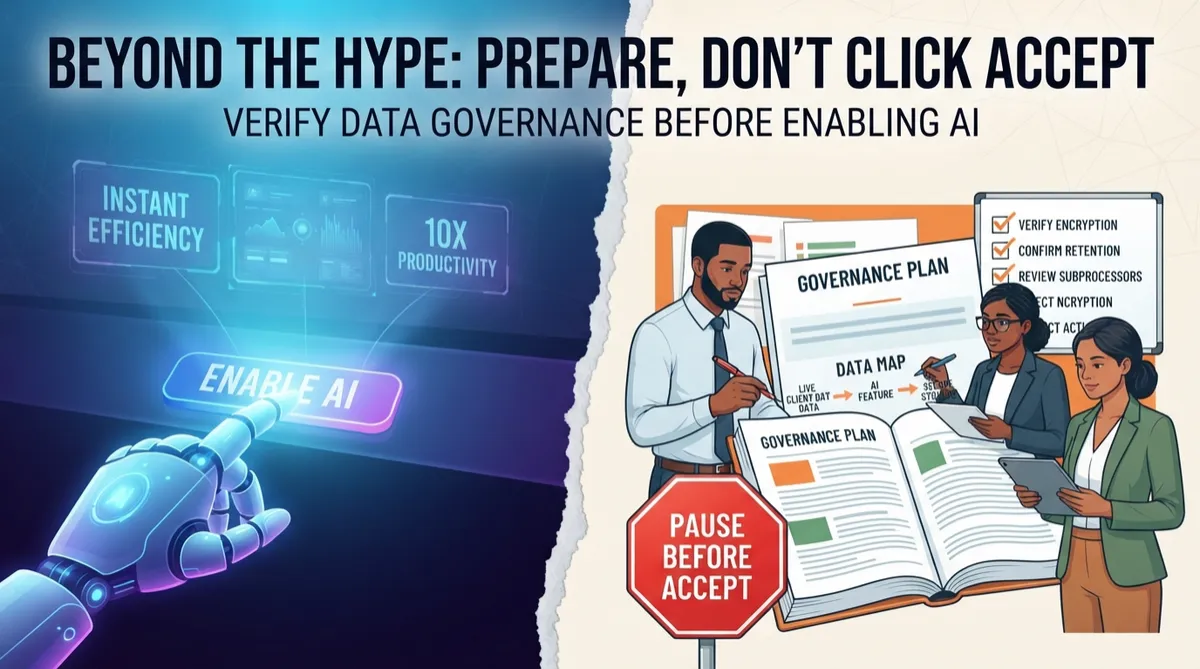
A new AI button showed up in your accounting software. Should you click it?
A new AI button showed up in your accounting software. Should you click it?
What to check before you let an AI feature touch client financial data
The AI feature probably works fine on a technical level. The real question is whether you know what data it touches, where that data goes, and who can turn it off if something goes wrong. Most small firms haven't answered that yet, which means the right move is to prepare, not to click accept.
Decision: prepare (confidence: 72%)
Vendor claims about encryption and opt-in controls are not the same as verified data governance. Until someone at the firm has reviewed the actual settings, retention terms, and subprocessor list, enabling the feature on live client data creates a risk that is hard to reverse and harder to explain to a client later.
The decision in front of the owner
Your accounting software just lit up with a new AI feature. Maybe it summarizes transactions, flags anomalies, or drafts client reports. It showed up in an update you didn't ask for, and now there's a button asking you to turn it on. That's the moment that matters, not some abstract question about whether your firm needs an AI strategy.
The decision isn't "should we use AI." It's narrower and more practical: should you connect client financial data to a feature you didn't choose, built by a vendor you already trust for other reasons, without first checking what happens to that data once it leaves your screen. Those are two different questions, and small firms often answer the second one by accident while thinking they're answering the first.
This matters more in finance and accounting than almost anywhere else in a small business. You're not just handling your own numbers. You're often the custodian of someone else's bank statements, payroll details, and tax records. A feature that's perfectly fine for a marketing team drafting email copy is a different animal when it touches a client's financial history. According to How to Write an AI Policy for an Accounting Firm, firms need a practical framework before adoption, not after a problem surfaces.
So the decision in front of you is this: do you flip the switch now because it's there, or do you spend a short, bounded amount of time finding out what the switch actually does. I'd pick the second one every time, and I've watched firms regret skipping that step more than once.
Why it looks attractive
The appeal is real. Manual transaction coding and reconciliation eat hours every month, and a feature that drafts summaries or flags anomalies promises to give that time back. Vendors in this space typically market these features with reassuring but vague language — broad claims that data is handled securely and that AI use is optional — without specifying what "secure" or "optional" mean in practice for your account tier or contract. That phrasing is illustrative of a pattern, not a quote from any specific vendor, and the vagueness itself is the point: it sounds complete while leaving the operational questions unanswered. A firm owner evaluating the feature should treat any such marketing language as a prompt to ask for the actual written terms, not as a substitute for them. Enterprise AI governance guidance consistently stresses that data handling commitments need to be explicit and contractual, not implied by general reassurance (blog.box.com/data-governance-for-ai).
What is commonly overlooked
The gap that gets overlooked is between "the feature works" and "you control where the data goes." Microsoft Copilot deployments have shown a documented failure pattern in enterprise settings: permission inheritance misconfigurations that expose files or data to the AI layer beyond what administrators intended, often without anyone noticing until an audit or incident surfaces it (opsinsecurity.com/learn/copilot-security). Accounting software isn't Copilot, but the underlying mechanism — AI features inheriting broader data access than a narrow task requires — is a general enterprise software risk, not a Microsoft-specific one, and small firms running lean IT have fewer safeguards to catch it.
A related gap: opt-out settings, where they exist, typically apply only to future data processing, not data already ingested. This pattern is well documented in consumer AI contexts, where opting out of model training stops new data from being used but does not retroactively remove what's already been processed (engadget.com/2268598/how-to-stop-ai-companies-training-your-data). Enterprise accounting vendors may handle this differently, and firms should get written confirmation of retroactive versus forward-only opt-out before assuming either applies - the consumer pattern is a reason to ask the question, not proof of the answer.
What must be true for it to work
For the AI feature to be worth enabling, several things need to be true and documented in writing, not just implied by marketing copy. You need explicit confirmation of whether client data is used to train any shared or cross-customer model, versus staying isolated to your instance — this is the single most consequential data-handling distinction and vendors should be able to answer it in plain language in their contract or data processing addendum. You need granular admin controls that let you exclude specific data categories (SSNs, bank account numbers, client PII) from the AI feature entirely, not just a single on/off toggle. You need a tested rollback process, meaning you've actually turned the feature off once and confirmed what happens to data already processed. And you need retention terms that state how long your data persists in the vendor's AI pipeline after you stop using the feature. Adaptive Security's enterprise AI governance framework treats exactly these four items — training use, access granularity, reversibility, and retention — as baseline preconditions, not advanced controls (adaptivesecurity.com/blog/ai-governance-best-practices-a-complete-guide-for-enterprise-leaders). If a vendor can't produce clear answers to these in writing, that absence is itself the answer.
Hidden costs and operational requirements
The subscription cost, if there even is one beyond what you already pay, is the smallest number in this decision. The real costs show up in time and process, and they're easy to underestimate when you're staring at a feature that looks free to turn on.
Someone needs to spend real hours reviewing settings and writing a short internal policy specific to this tool, not a generic AI policy pulled off the internet. You'll need staff training, even if it's just a 20-minute team meeting covering what data categories are off-limits. If client data is involved at all, you may need to update client engagement letters or send a notice, which takes legal review time most 10-person firms don't have sitting idle. According to Consumer and professional AI privacy standards for legal work, consumer-grade AI tools can retain queries in ways that expose confidential communications, a concern that applies just as directly to financial client data as it does to legal work.
Then there's ongoing cost: someone has to periodically check how the feature is being used, spot-check outputs for accuracy, and keep a documentation trail in case a client or regulator ever asks what happened to their data. That's not a one-time setup cost. It's a recurring, if small, operational habit. If you're a 10-person team, you don't have spare staff to babysit a tool full time, so this needs to be a 15-minute monthly check, not a daily commitment, or it simply won't happen.
Risks and failure conditions
The clearest failure condition is silent vendor drift: a provider changes its data handling or training policy after you've already adopted the feature, and the change is disclosed only in a terms-of-service update most users never read. This is a well-established pattern in consumer AI products, where companies have repeatedly adjusted training-data policies with limited proactive notice (blog.mega.io/how-to-opt-out-of-ai-training). B2B software vendors are generally more contractually constrained than consumer platforms, but the underlying incentive — using customer data to improve models unless told not to — is the same, and accounting firms should treat this as a reason to put renewal and change-notification terms in writing rather than assume enterprise contracts are immune to the pattern.
A second failure condition specific to accounting work: a professional-use context carries different stakes than a consumer one. Thomson Reuters' comparison of consumer-grade versus professional-grade AI privacy standards for legal work makes the point directly — tools built for consumer convenience are not vetted for professional confidentiality obligations, and using them interchangeably is itself the risk (legal.thomsonreuters.com/blog/the-consumer-vs-professional-ai-privacy-standards-for-legal-work). The same logic applies to accounting: a bolt-on AI feature inside general-purpose software was not necessarily designed with the confidentiality duties accountants owe their clients in mind. Beyond data handling, firms should also clarify contractually who bears liability if a client's data is exposed through the AI feature — the vendor's terms of service, not general AI governance principles, will determine this, and it's worth confirming before enabling anything whether your professional liability coverage addresses AI-related data incidents at all.
Non-AI alternatives
Four non-AI paths deserve real consideration, not just a mention before returning to the AI option. First, rule-based automation already built into most accounting platforms — bank feed matching rules, recurring transaction templates, scheduled reports — solves a meaningful share of the manual-entry burden without sending any data through an external model. This is usually underused relative to its capability. Second, tightening the existing manual reconciliation workflow with checklists and batching can reduce time spent with zero new data exposure, though the time savings are smaller and depend on current process discipline. Third, a narrower purpose-built tool with clearer data governance documentation than a bolt-on AI feature may serve the same function with less ambiguity about where data goes — worth evaluating as a direct swap rather than an add-on.
Fourth, and worth taking seriously rather than treating as a formality: engaging a third-party compliance consultant to review vendor contracts and data-handling terms before adoption. This typically costs less than a single data-exposure incident would and gives the firm an independent read on contract language it may not have the expertise to evaluate in-house. For a small firm, this is a reasonable middle ground between doing the legal review yourself and skipping it entirely — it costs real money upfront but converts an unknown risk into a known, bounded one. It's most worth doing when the firm's client base includes high-sensitivity data (SSNs, financial account numbers) where the cost of getting the contract terms wrong is substantial.
Measurement requirements
Before enabling anything, establish a baseline: current time spent on manual entry and reconciliation per week, current error/correction rate, and current client data footprint (which clients have highly sensitive data types in the system). After a sandbox trial, measure three things against that baseline — time actually saved (not time the vendor claims is saved), the rate of AI-generated errors or flags requiring manual correction, and any instance of the tool touching data outside its intended scope.
Time saved is not the same as ROI. A feature that saves four hours a month but creates one data-handling incident has negative ROI the moment you account for client notification costs, potential liability exposure, and reputational damage — costs that don't show up in a simple hours-saved calculation. A more honest measurement ties the exception count (errors, scope violations, unexpected data access) to a real cost comparison: the hourly value of time saved versus the estimated cost of a single incident, however rough that estimate has to be. If you can't put even a rough number on the downside, that's itself a signal you're not ready to move past the sandbox stage. Track every exception during the trial — an odd output, an incorrect flag, or a setting that seemed too permissive — and treat three or more in a 30-day trial as a stop signal, not a tuning problem.
Recommended decision
Prepare, don't adopt yet. The feature is not inherently unsafe, but most small firms haven't done the groundwork to know whether it's safe for their specific client data, and the toggle makes it easy to skip that groundwork entirely. Preparation means getting written answers on training use, retention, and opt-out scope (detailed in Section 4), running the sandbox test in Section 10, and deciding in advance what would make you turn the feature off.
This is a narrow, reversible decision, not a strategic commitment — treat it that way. The cost of waiting four to six weeks to get these answers is small. The cost of enabling first and asking questions later is not, particularly for a firm handling other people's financial data under professional obligations that consumer AI tools were never built to meet.
Practical next step
Run a sandbox test using non-sensitive or synthetic data before touching any real client file. While that test runs, request the vendor's written answers to the four questions laid out in Section 4: whether client data trains any shared model, what granular controls exist to exclude sensitive data categories, what happens to data already processed if you turn the feature off, and how long data persists in their systems after you stop using it.
If the vendor can't answer clearly in writing within a reasonable timeframe, that's your answer regardless of how the sandbox test goes. If the sandbox test shows weak time savings, the governance question is moot. Only move to a real-data pilot once both conditions clear: documented governance terms you're comfortable with, and a sandbox result showing the time savings are real.
Alternatives
AI option: Enable the vendor's built-in AI feature to reduce manual data entry and generate transaction summaries or anomaly flags, after confirming data handling terms in writing.
Traditional automation: Use the rule-based automation already in most accounting software, bank feed matching rules, recurring transaction templates, and scheduled reports, which solve much of the manual entry burden without sending data through an external AI model.
Process improvement: Engage a third-party compliance consultant to review vendor contracts and data-handling terms before adoption — typically a bounded, one-time cost that's small relative to the cost of an unreviewed contract going wrong, and a reasonable middle ground for firms without in-house contract expertise.
Software configuration: Evaluate whether a narrower, purpose-built tool with clearer data governance documentation serves the same function better than a bolt-on AI feature inside your existing platform.
Human-led: Keep a staff member or contracted bookkeeper doing the review manually for client-sensitive work, accepting the added time cost in exchange for full auditability and no new data flows.
Recommended: Start with the sandbox test using non-sensitive data alongside the written vendor documentation review. This lets you judge usefulness and governance risk at the same time before touching any real client file.