Real AI ROI: Customer Service Automation Before You Trust the Output
Real AI ROI: Customer Service Automation Before You Trust the Output
A decision brief for small businesses weighing an AI support tool against the review work it actually requires
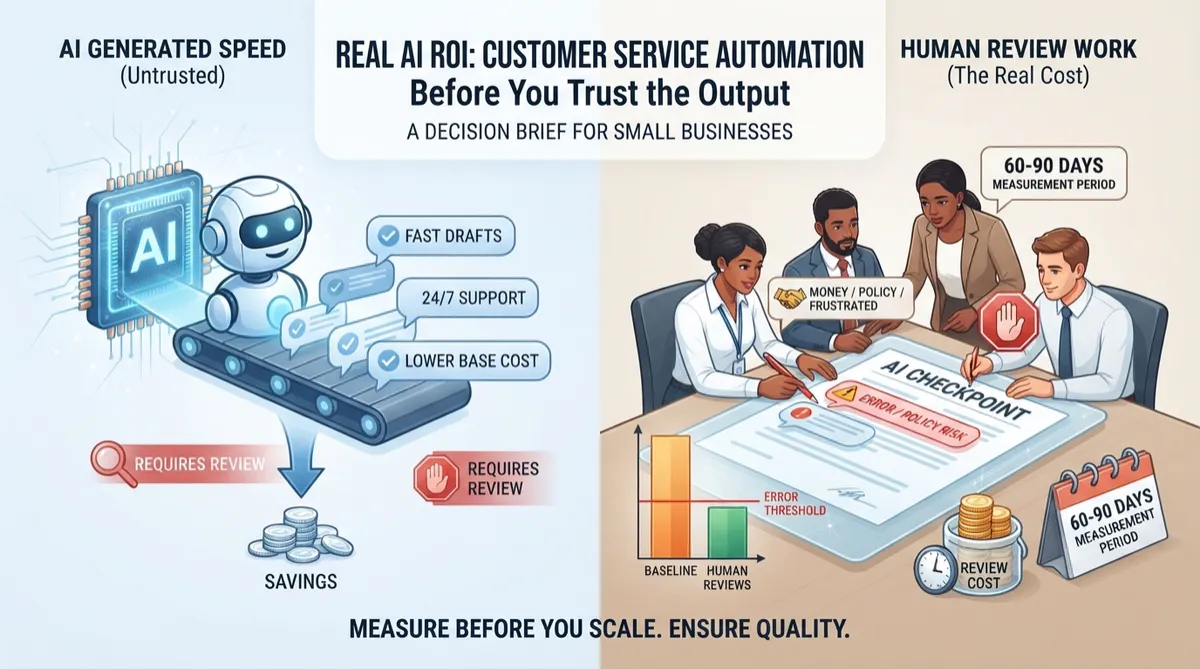
AI customer service tools can cut response time, but the savings are easy to overstate if you skip the review cost. Before you trust any AI-generated reply going out under your business name, you need a baseline, an error rate you can live with, and a human checkpoint for anything involving money, policy, or a frustrated customer. Measure for 60 to 90 days before deciding whether to scale.
Decision: conditional proceed (confidence: 65%)
A small support team (say, 2 to 5 people handling customer tickets) can get real time savings from AI drafting and triage, but only if someone owns the review step and the knowledge base is clean enough to not produce confident wrong answers. The risk isn't that the tool fails outright. It's that it sounds right while being wrong, and nobody catches it until a customer does.
Current baseline
You can't know if an AI tool is working if you don't know what 'working' looked like before it showed up. Most small support teams don't have this number written down anywhere. They know tickets feel busy, but they haven't counted volume, average resolution time, or cost per ticket in any formal way.
Start with 30 days of recent ticket data. Pull volume by category (billing, shipping, product questions, complaints), average time to first response, average time to resolution, and your current CSAT if you track it. The metrics worth tracking here are well documented. 20 Customer Service Metrics to Track in 2026 lists CSAT, first contact resolution, average resolution time, reopen rate, and escalation rate as the core set, and reopen rate in particular matters for AI evaluation because it tells you how often a 'resolved' ticket wasn't actually resolved.
If you're a 10-person team, you probably don't have a dedicated analyst to build this baseline. That's fine. A spreadsheet with ticket count, category, and resolution time is enough. Here's the part nobody wants to do first: go back through last month's tickets and tag them manually if your helpdesk doesn't already report this. It takes an afternoon, not a week, and without it you're comparing the AI tool to a vague feeling instead of a real number.
Expected improvement
Vendors will tell you response time drops significantly and satisfaction scores climb right after launch. Treat that as a starting hypothesis, not a fact about your business. A demo environment with clean sample data isn't your environment, with your messy product catalog and your three-year-old FAQ page nobody's updated.
Realistic improvement for a small team usually looks like faster first response on routine tickets (think shipping status, return policy, hours of operation) and some reduction in time spent drafting replies to common questions. It does not usually mean instant resolution of complex or emotional tickets, and it rarely means you can cut staff. Top 10 AI Customer Service Companies 2026 frames these tools as productivity aids for call centers, which is a more honest framing than 'replaces your team.'
Set your expected improvement in writing before you start: a target like '20 to 30% reduction in average first-response time on routine tickets within 90 days' gives you something to check against later. If leadership's expectation is 'make customer service better with AI' without a number attached, that's a sign you're not ready to measure this yet, you're just reacting to a trend.
Software cost
Subscription pricing for small business AI customer service tools can start around $25 per agent per month, according to Top 10 AI Customer Service Companies 2026. Treat that as a vendor-reported starting price, not a fully loaded cost estimate for your team. For a 3-5 person support team, a rough extrapolation from that per-seat figure would land in the $75-125 monthly range before add-ons — but this is this brief's own arithmetic, not a number the source states directly, and it excludes usage-based charges for volume, voice, or advanced features that can push real monthly cost well above the quoted starting price.
Implementation cost
Setup time ranges from a single day to a couple of months depending on integration complexity and how much content cleanup is needed, per How Long to Implement AI Customer Service?. On top of that, expect staff hours spent mapping fields and testing the connection to your existing helpdesk or CRM. A specific weekly time budget for the first month isn't something the cited source quantifies — plan to track actual hours spent during your own rollout rather than relying on a fixed estimate, since integration complexity varies a lot by what helpdesk or CRM you're connecting to.
Training cost
Training cost here is less about formal onboarding and more about two things: hours spent cleaning and updating the knowledge base the AI draws from, and the calibration period where staff learn how much to trust AI drafts before review starts speeding up rather than slowing down. General small-business AI guidance (see AI Best Practices for Small Businesses) supports the broader point that change management and clean source content are preconditions for getting value from an AI tool, though that source is general best-practices guidance rather than customer-service-specific, so treat the connection as directionally sound rather than a precise match to this use case.
Review cost
Every AI-drafted reply needs a human check before it goes out, at least until you have enough tracked history to trust specific categories unsupervised. That review has to cover three things: tone, policy accuracy, and factual correctness — did the tool invent a refund policy, a shipping timeline, or a product detail that isn't real. This is not a hypothetical concern; it's the central risk vendors and independent analysts flag with AI-generated text, often called hallucination (see Splunk's explainer on AI hallucinations and Parloa's overview). A confident, well-formatted wrong answer is harder to catch than an obviously broken one, which is exactly why review cost deserves its own line item instead of being treated as a rounding error on top of drafting time saved.
In practice, this means budgeting real staff time, not just a quick glance per ticket. If review consistently eats most of the time the tool was supposed to save, the tool isn't delivering ROI yet, regardless of how fast the draft itself was produced. Track review time explicitly during the measurement period so you can compare it against time saved, rather than assuming the two roughly cancel out in the tool's favor.
Error and rework cost
AI hallucination in customer service isn't a rare glitch, it's a known failure mode. What are AI hallucinations in customer service? defines it plainly: a confident, plausible-sounding statement that is false, delivered to a customer as if it were fact. That's the scenario your review process exists to catch, and it's also the scenario that costs you the most when it slips through.
The cost isn't just the awkward follow-up email. It's the risk named across the evidence: erosion of customer trust if errors are discovered publicly, and regulatory exposure if the AI's wrong answer touches refunds, warranties, or legal commitments. 10 Common Hallucinations documents this pattern across industries, including synthetic details presented with full confidence, which is exactly what makes these errors hard to catch without deliberate review.
Build a simple log: every time a customer or staff member catches a wrong AI answer, write down what happened and what it would have cost if it had gone uncaught (a refund given incorrectly, a policy misstated, a customer who left a bad review). After 60 days, you'll have a real error rate and a real cost estimate, not a guess. If that error rate is higher than what you defined as acceptable before you started, that's your stop signal, not a reason to push through and hope it improves.
Adoption assumptions
This plan assumes staff will actually use the tool as intended rather than working around it — either by ignoring drafts and writing from scratch, or at the other extreme, rubber-stamping drafts without real review. It also assumes some share of customers will still want or escalate to a human, which means an escalation path needs to exist from day one rather than being added after a bad interaction. General guidance on responsible small-business AI adoption (see AI Best Practices for Small Businesses) reinforces that these adoption and change-management assumptions are common failure points, though again, that source speaks to AI adoption broadly rather than this specific tool category.
Capacity or revenue impact
Time saved on drafting doesn't automatically become revenue. The more defensible framing is capacity: if a team is currently at or near its limit on ticket volume, freed-up time can go toward handling more tickets at the same headcount, which only shows up as a business benefit if that extra capacity is actually used or if it prevents a near-term hire. If a team is not near capacity, the same time savings may just mean quieter afternoons, which is a real quality-of-work improvement but not something you should pencil into a revenue projection.
There is no cited data establishing a specific percentage of small teams that see a capacity gain versus a workload-smoothing effect — this is a judgment call that depends on current ticket volume relative to staff bandwidth, which is why the baseline in s1 and the measurement plan in s10 matter more than any general claim about typical outcomes. Treat any capacity gain as a hypothesis to confirm against your own tracked ticket volume and resolution time, not as an assumed outcome of adoption.
Measurement plan
Set a 60 to 90 day measurement window before making any scale or stop decision. Shorter than that and you're measuring the learning curve, not the tool. Track four numbers weekly: cost per resolved ticket (including review time), error or hallucination rate (tracked via your log), CSAT or reopen rate compared to baseline, and actual time staff spend reviewing versus drafting from scratch.
Compare these against the baseline you built in week one. 20 Customer Service Metrics to Track in 2026 is a useful reference for metric definitions if your team is inventing this tracking process for the first time, particularly reopen rate and escalation rate, which catch problems that raw resolution time hides.
Review the numbers at 30, 60, and 90 days with whoever owns the initiative and report plainly to leadership: is cost per ticket down, flat, or up once review time is counted. Don't let 'staff say it feels faster' substitute for the actual number. Feelings about a new tool are usually optimistic in month one and more honest by month three.
Scale, revise, or stop criteria
These thresholds are illustrative starting points, not settled benchmarks pulled from the evidence — set your own based on what your baseline in s1 shows and adjust during the 60-90 day measurement window. A reasonable starting point for scaling further: error rate stays within whatever range you decided you can live with, review time trends down as staff calibrate trust in the tool, and cost per resolved ticket (including review time) comes in at or below your pre-adoption baseline.
A reasonable starting point for revising scope rather than stopping: error rate is borderline, or review time is improving but still high, suggesting narrower use (fewer ticket categories, tighter approved-use list per the governance section) might work better than either full adoption or abandonment.
A reasonable starting point for stopping: cost per resolved ticket stays above baseline through the full measurement period, review time consistently consumes most of the time the tool was supposed to save, or an error reaches a customer in a way that causes real financial or trust damage. Whatever numbers you pick, write them down before you start measuring, so the decision at day 90 is a comparison against a pre-set bar rather than a judgment call made after the fact.
Alternatives
AI option: An AI customer service tool that drafts or auto-sends replies, triages tickets, and surfaces suggested answers from your knowledge base, with staff reviewing output before it reaches customers.
Traditional automation: A rule-based chatbot or decision-tree system that routes tickets and answers a fixed set of common questions without generating new text. It can't hallucinate because it only says what you pre-wrote, though it also can't handle anything outside its scripted paths.
Process improvement: Better ticket triage using features already built into most helpdesk software, combined with clearer product documentation and proactive communication (shipping updates, policy pages) that reduces the number of tickets coming in at all.
Software configuration: Canned response templates built directly into your existing helpdesk, letting staff pick and lightly edit pre-approved answers for common questions without any AI generation involved.
Human-led: Hiring part-time or outsourced human support staff to handle ticket overflow during peak periods, which adds predictable headcount cost without the review and error-correction overhead of an AI tool.
Recommended: Start with improved self-service FAQ content and canned response templates before adding AI drafting on top. Clean content fixes a large share of ticket volume and confusion on its own, and it makes any future AI tool more accurate because it has better source material to draw from.
ROI Analysis
Baseline needed: Thirty days of ticket volume by category, average resolution time, current CSAT if tracked, and a rough fully loaded cost per ticket based on staff hours spent on support.
Direct costs: Subscription pricing for small business tools can start around $25 per agent per month according to Top 10 AI Customer Service Companies 2026. A rough extrapolation to $75-125/month for a 3-5 person team is this brief's own calculation based on that per-seat figure, not a number stated by the source — and usage-based add-ons for volume, voice, or advanced features can push the real monthly cost well above the quoted starting price.
Implementation costs: Setup time ranges from a single day to a couple of months depending on integration complexity and how much content cleanup is needed, per How Long to Implement AI Customer Service?, plus staff hours spent mapping fields and testing the connection to your existing helpdesk or CRM.
Training costs: Hours spent cleaning and updating the knowledge base the AI draws from, plus a few weeks of staff learning curve to calibrate how much to trust AI drafts before review speeds up.
Review costs: Staff time to check every AI draft for tone, policy accuracy, and factual correctness before sending, which can offset much of the drafting time saved if error rates are higher than expected.
Adoption assumptions: Assumes staff will actually use the tool rather than working around it, and that some share of customers will still want or need a human, requiring a built-in escalation path from the start.
Capacity impact: Time saved on routine ticket drafting can free staff to handle more tickets at the same headcount, which matters most if the team is currently at or near capacity.
Measurement period: Sixty to ninety days minimum, with checkpoints at 30, 60, and 90 days against the pre-adoption baseline.
Governance
Approved use: Define upfront which ticket types the AI is allowed to answer directly versus draft-for-review versus always route to a human, and write it down so staff aren't guessing case by case.
Data access: Customer names, order history, and sometimes payment details are sent to a third-party AI vendor's servers, so confirm data handling terms and retention policy before sending live customer data, consistent with the caution in AI Best Practices for Small Businesses.
Human review: Full review of every AI draft involving refunds, policy exceptions, or an upset customer for the first 60 to 90 days, moving to spot-check review only after the tracked error rate proves acceptably low.
Escalation: A named staff member or role who takes over any ticket the AI can't resolve correctly, flagged either by the tool itself or caught during review, with a clear handoff rather than the customer bouncing between systems.
Accountability: The customer service lead owns day-to-day review and error tracking, with the owner or manager signing off on anything touching legal language, refunds, or public policy statements.
Sources
Top 10 AI Customer Service Companies 2026: Functions & Prices
What to check before sending an AI-generated customer response
AI Best Practices for Small Businesses: How to Use AI Responsibly